As an SVFF affiliate, you can easily share our courses with potential new students and earn a commission on every sale made through your unique link. Follow these steps to get started:
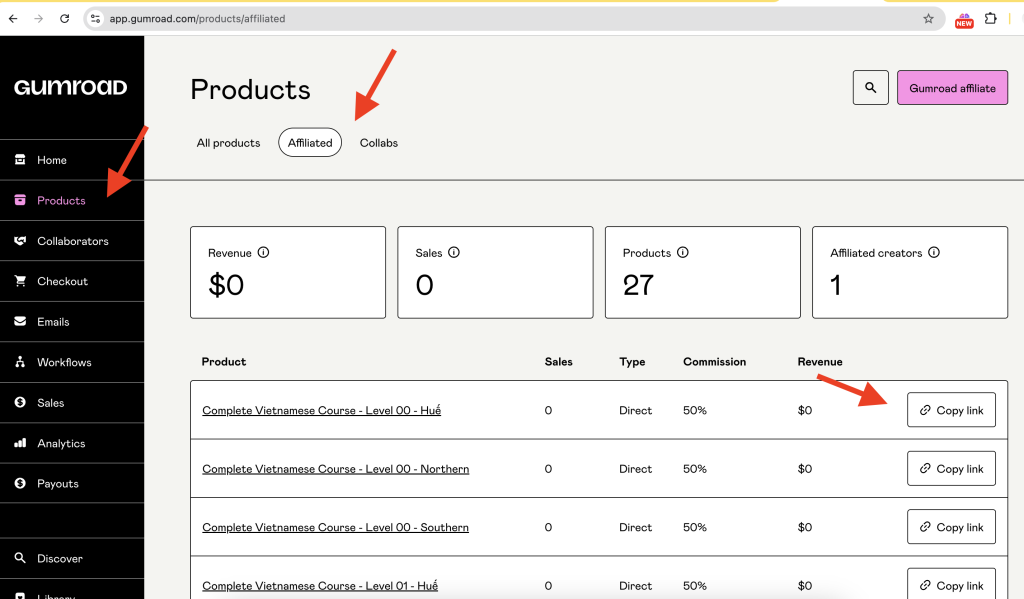
- Create a Gumroad Account:
- Before you begin sharing, make sure to create a Gumroad account if you haven't already. Sign up at Gumroad.
- Visit the Affiliate Dashboard:
- Go to the link: Gumroad Affiliate Dashboard.
- Here, you'll see all the courses you're linked to.
- Copy Your Affiliate Link:
- Find the course you want to share.
- Copy the unique link associated with that course.
- Share the Link:
- Send the link to someone who is interested in learning with SVFF.
- When they purchase the course using your link, you’ll earn a commission.
- Set Up Your Payout:
- To receive your commission, set up your payout information by visiting this link: Set Up Payout.
- Make sure your payout details are correct to receive payments.
- Get Paid Automatically:
- Once your payout details are set up, payments will be sent to your account automatically.
- Gumroad is a trusted global platform that handles everything for you.
Gumroad Affiliate Program
- Tracking Purchases:
Gumroad uses browser cookies to track purchases made through your affiliate links. These cookies are valid for 7 days, meaning you’ll be credited if a purchase is made within this period.
Sticky Affiliate Links
- Why Use Sticky Links?
Standard affiliate links rely on cookies, which some browsers block. If this happens, you won’t be credited for the sale. To avoid this, use a "sticky" affiliate URL to help ensure you get credited. - Creating a Sticky Affiliate Link:
- Format:
https://gumroad.com/l/:product_permalink?affiliate_id=<affiliate_id> - Example:
If your standard affiliate link ishttps://gumroad.com/a/1234567and it redirects tohttps://gumroad.com/l/abcxyz, your sticky link would be:https://gumroad.com/l/abcxyz?affiliate_id=1234567
- Format:
- Note:
You must share the correct affiliate link to receive credit. Incorrect links or shortened product links without your affiliate ID won’t earn you a commission.
Getting Paid for Your Affiliate Sales
- Payment Process:
Gumroad pays affiliates in the same way it pays creators. Once your payout details are set up, you’ll receive automatic payments, usually processed weekly or monthly. - Membership Products:
If you help sell a membership product with recurring charges, you’ll receive a portion of each payment made by the customer. - Refunds:
If a customer requests a refund, you’ll lose your commission for that sale. If you’ve already been paid, the refunded amount will be deducted from your balance, which could go negative.
Integrating Affiliate Links into Your Website
- Using Widgets:
You can integrate affiliate links directly into your website using Gumroad’s widget codes. This is a convenient way to promote products and track sales from your site. - Link Shortening:
You can use link shorteners like bit.ly to customize your affiliate links. Just ensure the shortened link still points to your correct affiliate URL.
Verifying Your Affiliate Link
- How to Check:
To ensure your affiliate link is working, click on it and check for the_gumroad_affiliate_id_cookie in your browser’s developer tools. This confirms that the link is correctly tracking sales.
If you have any questions or need further assistance, feel free to contact us. Happy promoting and earning!
If you have any questions, feel free to contact us!

0 Comments
Log in to leave a comment.